Turn Walk-Ins into Online Bookings
A walk-in is your warmest customer and the easiest to lose. Here is how to turn a one-off visit into a booked repeat appointment before they leave the counter.
LovingBooking Team
6 min read

In this article
How to turn walk-ins into online bookings
Convert in-person, one-off customers into booked, repeat appointments by capturing their next visit at the counter and giving them an easy way to rebook online.
Put a booking QR where customers wait
Turn your booking link into a QR code and print it small for the moments people are already standing still — the front desk where they pay, the mirror beside the chair, or the receipt you hand over. Keep the wording plain: "Scan to book your next visit."
Ask one question at checkout
As you settle the bill, ask a single, consistent question that fits your trade — "Same time in four weeks?" for a salon, "Shall I book your follow-up before you go?" for a clinic. One sentence, said every time, converts more walk-ins than any campaign.
Book it yourself when they say yes
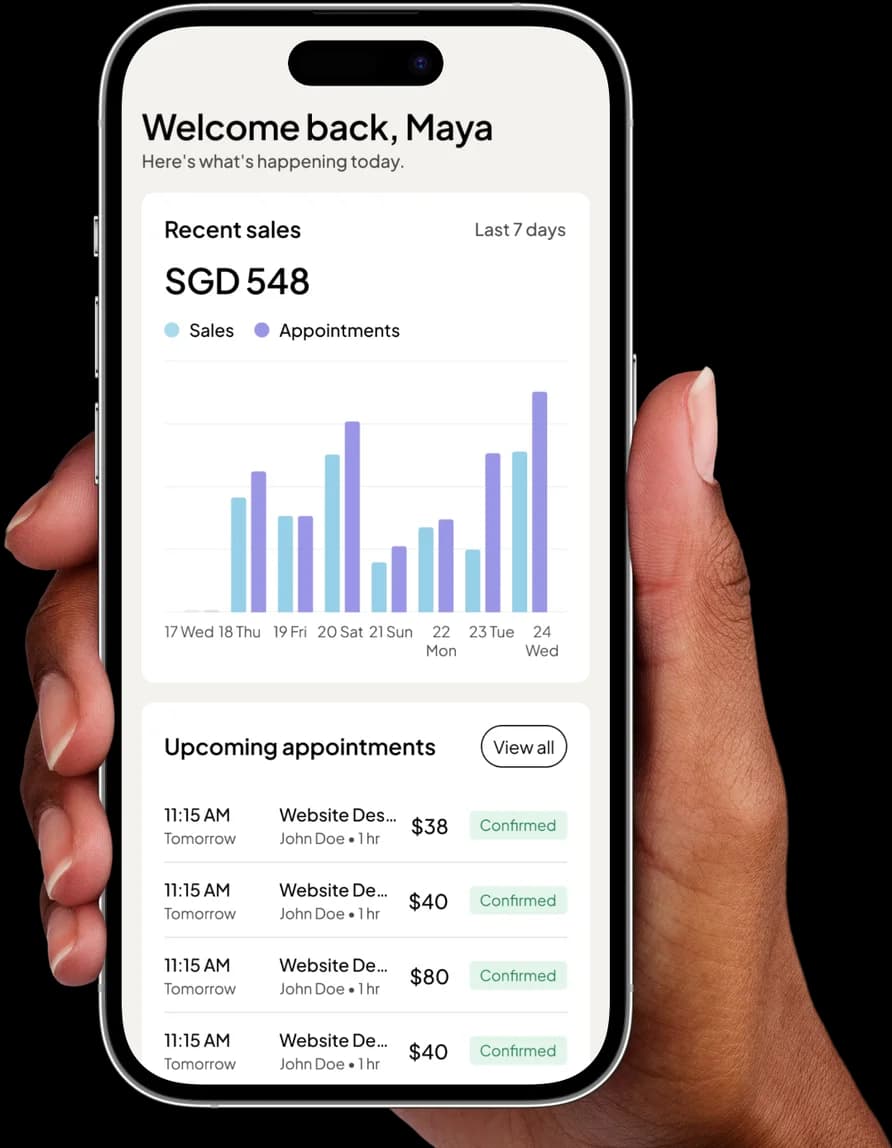
Open the New appointment builder in your dashboard and drop the customer straight into their slot. They leave with a confirmed time and a confirmation email already on the way, which removes the gap where "I'll book later" quietly turns into never.
Send one follow-up with the link
For the walk-ins who did not rebook at the counter, send one short, human message a day or two later with your booking link. The link shows live availability and books the appointment on its own, so there is no back-and-forth about free times.
Keep the link in every online spot
Put the same booking link in your Instagram bio, Google Business Profile, and WhatsApp quick replies. A customer you met in person will look for you online next time — make sure the first thing they find is a tappable way to book, not a phone number.
A walk-in is the easiest customer you will ever get and the easiest one to lose. They found you on their own, decided you were worth a try, and paid — no ad, no reminder, no chasing. Then they leave, and unless the visit was memorable enough to bring them back by itself, you are relying on luck and foot traffic to see them again. The whole point of online booking is to remove that luck: capture the walk-in while they are standing in front of you, and turn a one-off visit into a second appointment already on your calendar.
This is not about turning walk-ins away or forcing everyone onto an app. It is about giving a customer who is already happy an easy way to come back — and making sure that when they think "I should book again," the path is one tap, not a phone call during your busiest hour.
Why the Walk-In Is Worth Capturing
Most small businesses treat walk-ins and online bookings as two separate worlds. They are not. A walk-in is just an online booking that has not happened yet. The customer is warm, satisfied, and physically present — the single best moment you will ever have to secure their next visit. Miss it, and you are back to hoping they remember you in six weeks.
Capturing the walk-in does three things at once. It fills a future slot you would otherwise have to fill with marketing. It gives you a name and a contact detail for someone who was previously anonymous. And it starts a pattern: a customer who has booked online once will almost always book online again, which quietly moves your busiest phone-and-DM traffic onto a page that answers itself.
Put a Booking QR Where People Wait
The lowest-effort way to convert a walk-in is to make your booking page unavoidable while they are standing still. Every service business has a moment where the customer is waiting — at the counter, in the chair, by the till while you take payment. That is prime real estate.
Turn your booking link (lovingbooking.com/book/your-business) into a QR code with any free QR generator and print it small. Put it:
- On a standing card at the front desk, where people pay.
- On the mirror or wall beside the chair or treatment bed.
- On the receipt or invoice you hand over.
Keep the wording plain: "Scan to book your next visit." No walk-in has ever been offended by an easy way to rebook. If you have not set your page up yet, our guide on setting up online booking in fifteen minutes gets you a link to turn into a QR today.
Give every walk-in a way to book again
Start freeRebook Before They Leave
The strongest version of this does not wait for the customer to scan anything — you do it for them. As you are wrapping up, settling the bill or cleaning down, ask the simple question: "Same time in four weeks?" If they say yes, you have two ways to lock it in:
- Book it yourself. Open the New appointment builder in your dashboard, drop them into the slot, and it is done — they walk out with a confirmed time and a confirmation email already on the way.
- Hand them the link. If they are not sure of the date, send them the booking link on the spot and let them pick when they check their calendar at home.
Booking it yourself is the higher-conversion move because it removes the gap where good intentions go to die. A customer who says "I'll book online later" often does not. A customer who leaves with a confirmed appointment almost always keeps it.
Follow Up Once, With a Link
Not every walk-in will rebook at the counter, and that is fine — the follow-up catches the rest. A day or two after the visit, a short, friendly message with your booking link gives them a second, low-pressure chance to come back on their own terms.
Keep it human and keep it to one send; nobody rebooks because they were nagged five times. Something like: "Thanks for coming in on Saturday. Whenever you are ready for your next visit, you can book any open slot here: [link]." The link does the work. It shows your live availability, so there is no back-and-forth about what times are free, and it confirms the appointment without you touching your phone.
Keep the Link Everywhere Else, Too
The walk-in you converted today will look for you online tomorrow. When they do, the booking link should be the first thing they find, not a phone number. That means putting the same link in every place a returning customer might check:
- Your Instagram bio — the single highest-traffic spot for most Singapore SMBs. Our step-by-step on the Instagram bio link covers exactly how.
- Your Google Business Profile, so it appears when someone searches your name.
- Your WhatsApp replies, saved as a quick reply you can paste in seconds.
The goal is that a customer never has to ask "how do I book?" The answer is always the same tappable link, whether they met you in person or found you online.
A Simple Counter Script
You do not need a sales pitch. You need one sentence, said at the right moment, every time. Pick the one that fits your trade and use it on every walk-in:
| Trade | What to say as they pay |
|---|---|
| Salon / barber | "Want me to pop your next cut in now? Same time in four weeks?" |
| Clinic / therapist | "Shall I book your follow-up before you go?" |
| Trainer / studio | "Scan this to grab your next session — the open slots are all on there." |
Consistency is what makes it work. It is not a campaign you run once; it is a habit at the counter. Do it with every walk-in for a month and you will watch a real share of them turn into booked, named, repeat customers — the kind who fill your quiet Tuesdays without you lifting a finger.
Start With One Thing
If all of this feels like a lot, do the single highest-return thing first: put a booking QR at the counter and ask one question at checkout. That alone will convert more walk-ins than any ad you could buy this month. Everything else — the follow-up, the links, the counter script — is just widening a door that is already open. And once your regulars are booking online, the page starts running the quiet parts of your day for you, the way the best booking pages are meant to.
Ready to give your walk-ins somewhere to rebook? Create your free booking page and put the link on your counter today.
Give every walk-in a way to book again
Share your booking page as a QR at the counter, or add their next appointment yourself — either way they leave with a confirmation and you fill a future slot.
Start for freeFree to start · No credit card
Frequently asked questions
What is the fastest way to turn a walk-in into an online booking?
What is the fastest way to turn a walk-in into an online booking?
Rebook them at the counter yourself. While the customer is still with you and happy, ask if they want their next visit booked, then add it in your dashboard so they leave with a confirmed appointment and a confirmation email. It converts far better than asking them to book online later, because it removes the gap where good intentions get forgotten.
Do I need a QR code, and how do I make one?
Do I need a QR code, and how do I make one?
A QR code is optional but it is the lowest-effort way to capture walk-ins. It simply points at your existing booking link, so you can make one for free with any online QR generator by pasting in your page URL. Print it small, put it at the counter or on the receipt, and any customer with a phone can scan straight through to book.
Will asking every walk-in to book online annoy them?
Will asking every walk-in to book online annoy them?
No. You are not forcing anyone onto an app or turning walk-ins away — you are offering a happy customer an easy way to come back. A single question at checkout, or a small "scan to rebook" card, reads as helpful, not pushy. The trick is to ask once and let the booking link do the rest, rather than nagging.
What if a walk-in is not ready to book their next visit yet?
What if a walk-in is not ready to book their next visit yet?
Hand them the link instead of booking on the spot, and let them pick a date once they have checked their own calendar. A day or two later, one short follow-up message with the same link gives them a low-pressure second chance. Keep it to a single send — people rebook because it is easy, not because they were chased.
How does online booking help if the customer already comes in person?
How does online booking help if the customer already comes in person?
It turns an anonymous, one-off visit into a named, repeat customer. You capture their contact detail, you fill a future slot you would otherwise have to market for, and you move rebooking off your phone onto a page that shows live availability and confirms on its own. A customer who books online once almost always books that way again.
Can I book an appointment for a customer myself?
Can I book an appointment for a customer myself?
Yes. The New appointment builder in your dashboard lets you drop a customer into any open slot and confirm it in a few taps, which is exactly what makes counter rebooking so effective. The customer gets the same confirmation email a self-booked appointment would send, and the slot is locked in before they walk out the door.